Azure + Microsoft 365 cost report · AWS and Atlassian in beta
A linter for your Azure bill.Beta
Spendlint reads your bills and your licences without changing anything, then shows you what you are paying for and not using. Each saving says how disruptive the fix is, and gives you the command to run.
Finds less in a month than its band price? The report is free.
AWS and Atlassian are in beta. Scan either on its own, or alongside Azure and Microsoft 365 in one report.
| Resource | Meter | Cost |
|---|---|---|
| vm-api-01 | D8s v3 · 730 h | £302.44 |
| agw-legacy | Application Gateway v1 · empty backend | £180.00 |
| sqldb-main | General Purpose · 4 vCore | £512.10 |
| law-prod | Log Analytics · 4.5 GB/day | £274.90 |
| bas-dev-hub | Bastion · no sessions in 30 days | £212.00 |
| aoai-prod | Provisioned Managed Global · no reservation | £806.30 |
| redis-prod-session | Premium P1 | £226.38 |
of cloud spend is wasted, by the estimate of the people running it. Flexera, State of the Cloud 2026
of paid SaaS licences go unused. Zylo, SaaS Management Index 2026
of Microsoft 365 licences are inactive, oversized or unassigned across five million users studied. CoreView
Anyone can estimate. We check the bill afterwards.
A saving is a claim until a later bill agrees with it. Every rescan compares what it found with what it found last time, and every recovery is checked, resource by resource, against the month that came after. Here is that running on the sample estate.
-
June
Found it. The scan priced 10 of these from the June bill, among everything else in the report.
-
July
You acted. The next scan found them gone: $168/mo recovered across 10 findings. At this point it is still our arithmetic, not your bill's.
-
August
The bill answered. $148/mo confirmed gone from the August 2026 bill across 9 of them. And $20/mo that you believed was done is still being billed. You get told which one.
Figures from the sample estate, in USD; yours come from your own bill. The last line is the one that matters: a tool that only ever agrees with itself is not checking anything. Azure Advisor has no idea whether you acted on it, and neither does a spreadsheet.
How it works
Sign in and link a tenant
Microsoft or Google sign-in, then one consent screen for a work account with Reader access. No secrets to paste. A Global Administrator adds Microsoft 365 licence access in one more click, and a tenant with no Azure at all is scanned for its licences alone.
We scan, you preview
Most tenants take 5 to 20 minutes. Before paying you see the headline: how much is on the table each month, how much needs no change window at all, and where it comes from.
Unlock the report
From £250, once, priced by the size of the estate the scan measured. Every finding with evidence, the command, a rollback path and a portal link, plus JSON and CSV and free rescans for 30 days.
What a finding looks like
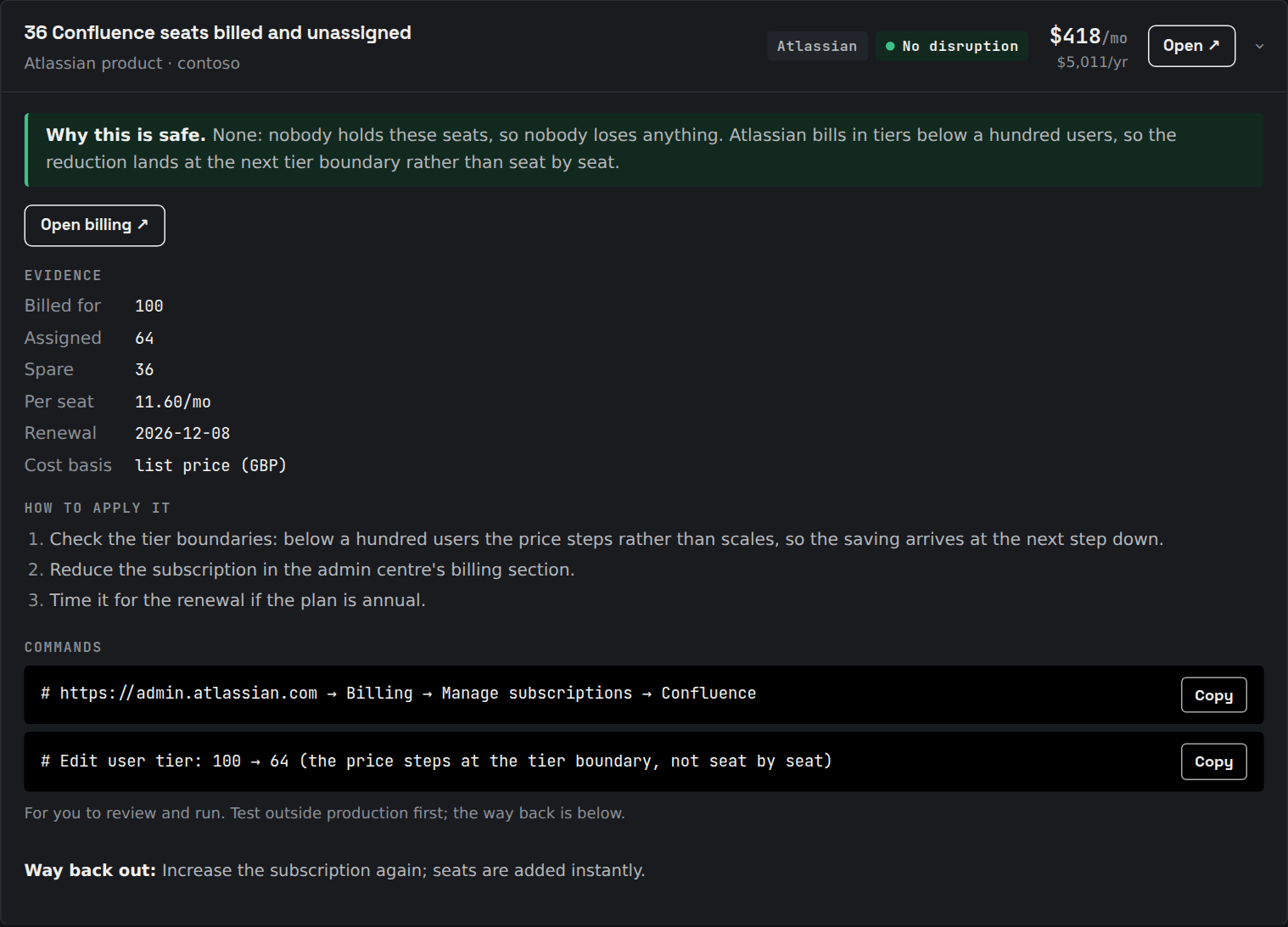
- Rated by disruption. None, low, or needs a change window. Anything that could endanger a workload is left out.
- Priced from your bill. Last month's actual cost for that resource where it exists, the retail rate otherwise, and the report says which.
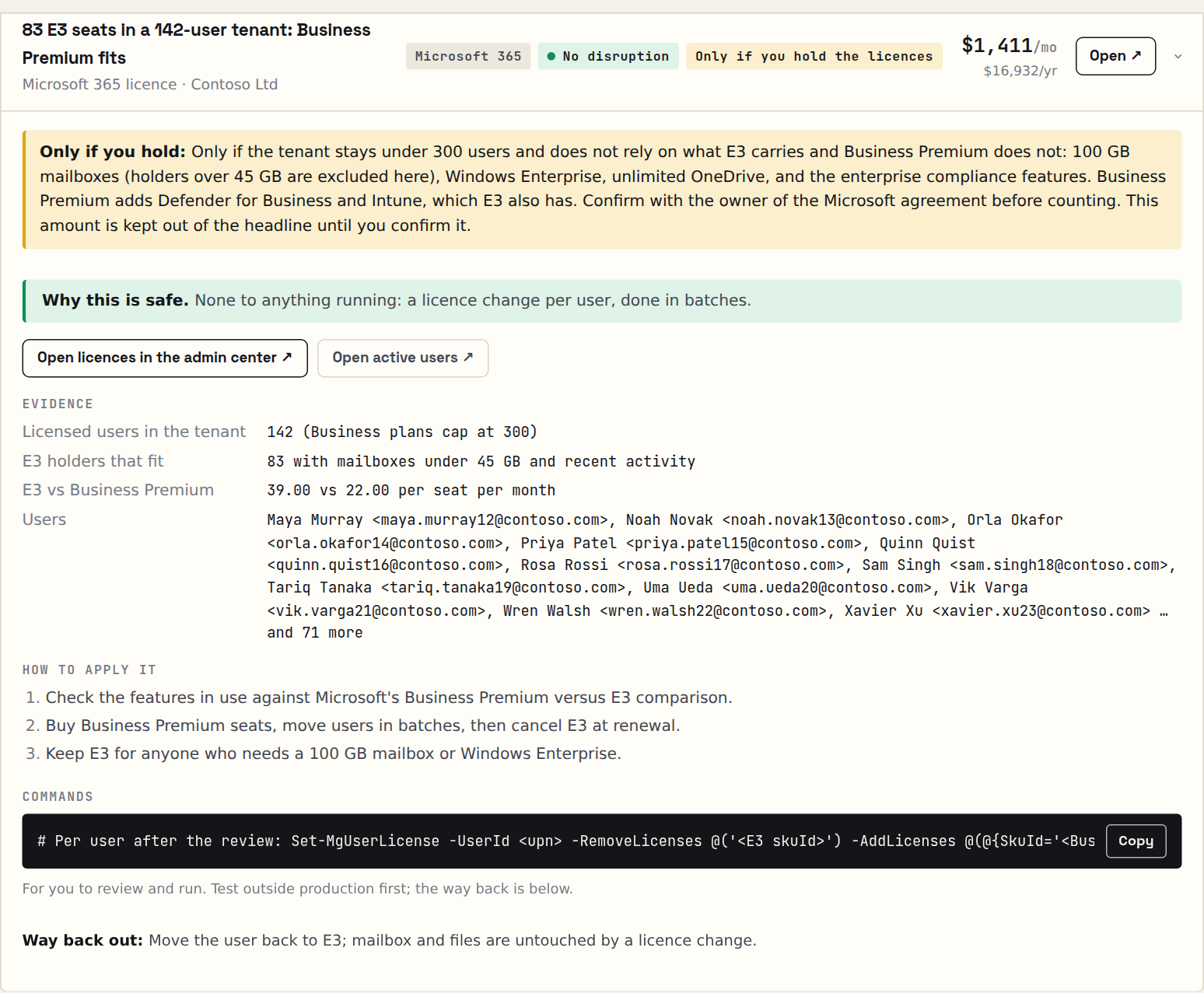
- Ready to run. The evidence, the command, the way back, and a link to the resource in the portal.
- Counted once. Overlapping options do not inflate the total. The plan groups the work by when it can be done: this week, this month, next quarter.
Find it. Prove it. Watch it.
Cost Analysis shows what you spent. Advisor lists what to resize. Spendlint reads last month's bill and finds the spend that does nothing, checks the next bill to see what you actually freed up, looks every day for what has changed, and dates the commitments that put the price back up when they run out. One read-only consent covers all of it.
Find
What am I wasting, and what do I do about it?
Every saving priced from last month's Cost Management lines and rated by disruption, with the command and the way back. The guardrails that stop it coming back, the moves to newer services with their retirement dates, and the Microsoft 365 licences, in the same report.
Prove
Did it work?
A rescan knows which findings have gone. Each one is valued at its run-rate and then checked against the next bill, meter by meter: confirmed, or still billed. You get a ledger per tenant and your return on what you paid.
Watch
What changed, and what is about to?
Daily cost for every subscription, resource group, service and resource, compared with the same weekday over the previous six weeks. When something moves, you get the resource that caused it and the finding that closes it, the morning it is first seen, and where the month is heading. Every report also dates what you have already bought: the reservations, savings plans and Microsoft 365 terms you own, and the day each one runs out. A reservation ending is nothing breaking and no alert firing, just the same machine at the undiscounted price from that morning on.
Why not just use Azure Advisor?
Advisor is a good start, and Spendlint includes every Advisor cost recommendation, de-duplicated against its own. But Advisor prices savings at retail rates, ignores your reservations, looks at seven days of CPU by default, and never sees a stopped-but-billing VM or a single Microsoft 365 licence.
| What you get | Azure Advisor | Spendlint |
|---|---|---|
| Savings priced from last month's actual bill, reserved compute excluded | Retail list rates, reservations ignored | Yes |
| Stopped-but-billing VMs, orphaned IPs, empty gateways, unused Bastion and NAT | Only in a separate preview workbook | Yes, priced |
| Microsoft 365 licences: unassigned seats, leavers, inactive users, Copilot, overlapping suites | No | Yes |
| Copilot all in: the seats in the admin centre plus the metered credits on the Azure bill, per person who holds a seat | No | Yes |
| Disruption rating, the command, the rollback | Guidance only | Every finding |
| What you actually saved, over time | No | A ledger per tenant, checked against the bill |
Pricing
Azure, Microsoft 365 or both, one price by the spend the scan measures, shown before you pay: Starter £250, Business £600, Enterprise £1,200, Enterprise Plus £2,400. A band price is a ceiling, not a promise: a report never costs more than half of what its first month frees up, so a big estate with little to find is charged for what was found. The preview is free whatever the size, and a scan that finds less in a month than its band price unlocks the report free.
Report · Find and prove
- Free preview of the headline savings and the payback period
- Every finding, command, rollback and portal link
- Azure and Microsoft 365 in one report
- Rescans for 30 days, so the ledger starts
- A report never costs more than half of what its first month frees up
- Free if the scan finds less in a month than its band price
Monitor · Watch, plus everything
- Unexpected spend explained, the morning it is first seen
- Every report for one tenant unlocked
- A fresh scan every 30 days, and what changed
- A savings ledger: realised to date and your return
- Yearly: 2 months free · cancel any time
Partner · the edition for MSPs
- Find, prove and watch across 5 tenants of any size
- Built for consultants and MSPs
- Opportunities per client, never in their report
- JSON and CSV for your own reporting
Prices exclude VAT. 14-day money-back on any report. The bands and the yearly prices, and a payback calculator for your own spend.
For MSPs and consultants
Walk into every review with the number already in hand.
Link each client tenant by consent, scan on a schedule, and open the quarterly review with what you recovered since the last one, plus a private page of what the client is missing that you sell. Partner covers 5 tenants.
How it treats your tenant
Questions people ask
Does it change anything in my tenant?
No. Every call the scan makes is a read: list resources, read metrics, read the bill, read licence assignments. The report tells you what to change and gives you the command; running it is your decision.
What access does it need?
An account with Reader on the subscriptions you want scanned, plus Cost Management Reader for actual spend. Microsoft 365 licence analysis needs a Global Administrator to grant five read-only Graph permissions once. A service principal works too.
How accurate are the numbers?
Each finding says what it was priced from: last month's bill for that resource, the live retail rate for your region, or the built-in price sheet. Reserved and savings-plan compute is excluded so a change there never counts as a saving. Overlapping recommendations are counted once.
How is the price decided?
By the monthly Azure and Microsoft 365 spend the scan measured, in three bands: Starter (under £5,000/month) £250, Business (£5,000–£25,000/month) £600, Enterprise (£25,000–£75,000/month) £1,200, Enterprise Plus (over £75,000/month) £2,400. The band is a ceiling: the charge is never more than half of what the first month frees up, so a large estate with little in it pays for what was found rather than for its size. You see the band, the cap and the amount on the preview, before paying.
What if you find very little?
The preview is free, so you see the headline before paying anything.The price follows what was found: never more than half of the first month. And if a scan finds less in a month than its band price, that report is unlocked for free. Any report comes with 14-day money-back.