Features and benefits
Find it, prove it, watch it.
Spendlint reads last month's bill, a month of utilisation, Advisor, reservations and the licence assignments, and answers three questions: what am I wasting, did it work, and what is changing. Everything below is a picture of the real thing.
rules across compute, storage, network, data, monitoring, security, commitments and licences
licence checks reading 8 Microsoft 365 usage reports, sign-ins and devices
guardrails against the waste coming back, each with how to set it
days of cost per resource behind the spend watch, judged every day
Pillar one · Find
What am I wasting, and what do I do about it?
The report: every saving priced from your own bill and rated by disruption, with the command and the way back, in a plan; then the guardrails, the moves to newer services, and the Microsoft 365 licences.
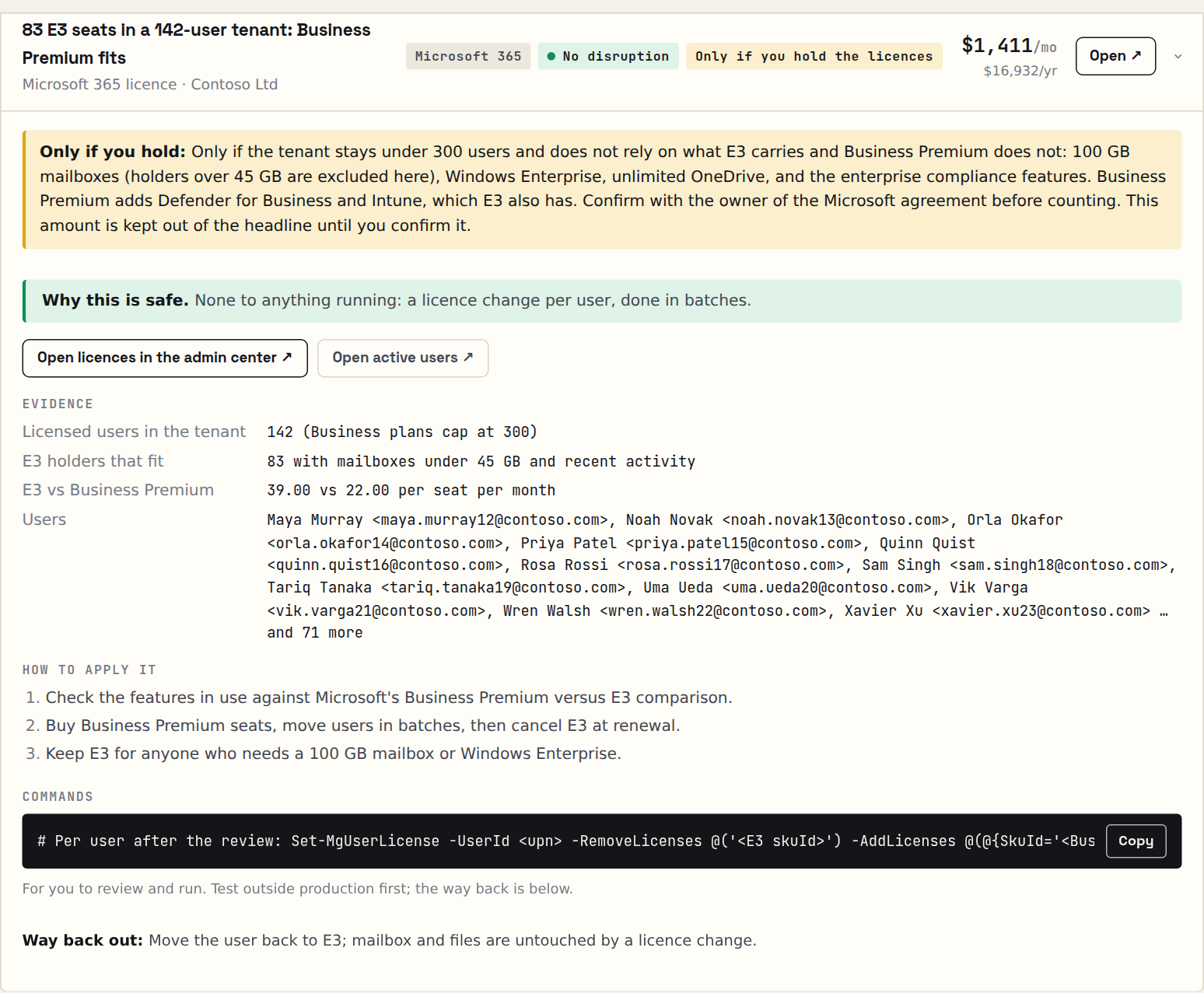
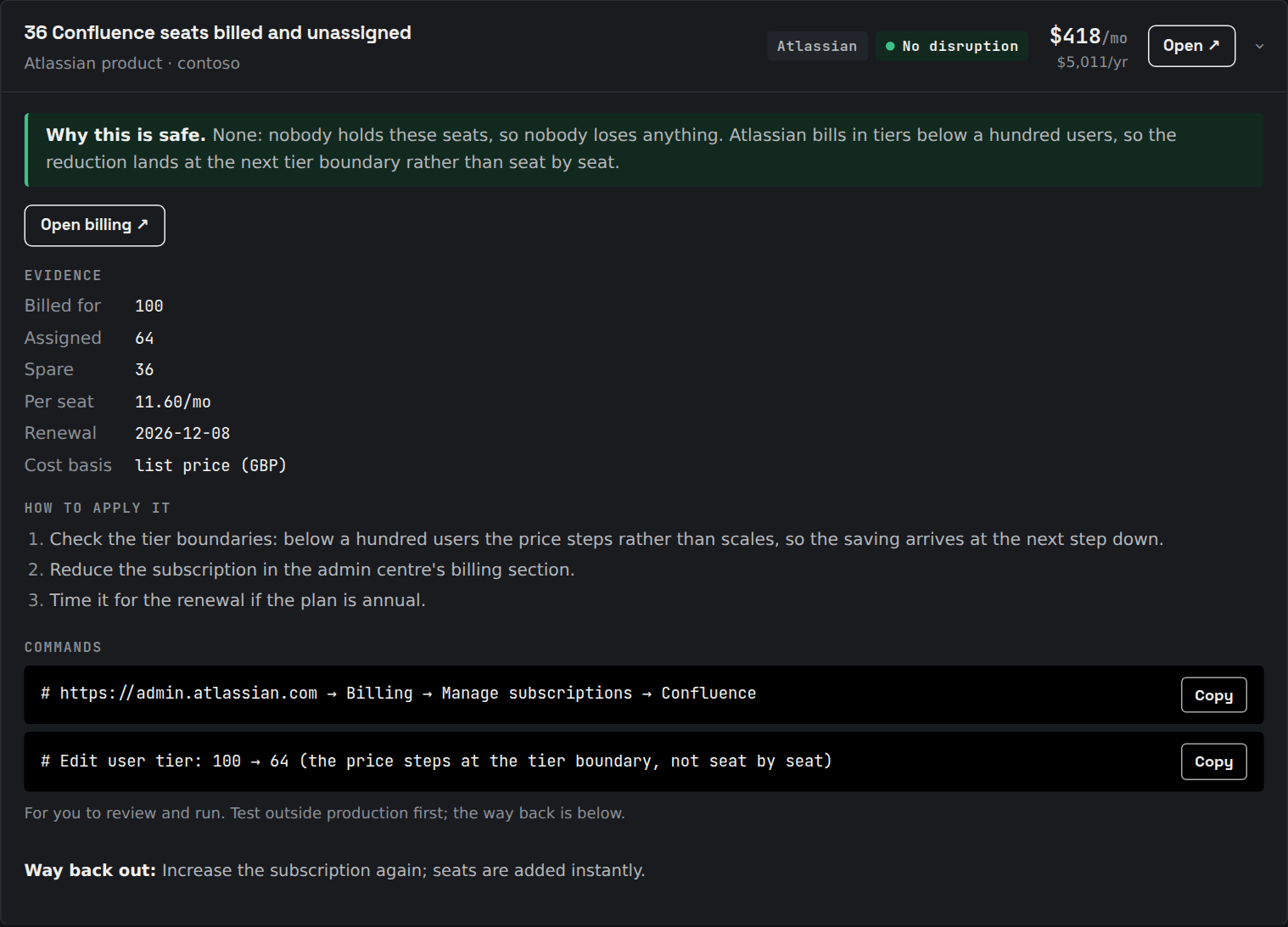
One finding, dissected
 Full size ↗
 Full size ↗
- Why it is safe. Which signals were read, over what window, and what they showed.
- Evidence. The metrics, bill lines and licence rows it was priced from, with the basis named.
- Disruption. None, low, or a change window. The safe money comes first.
- The command. Ready to paste, with a link to the resource in the portal.
- The way back. The command that undoes it, beside the one that does it.
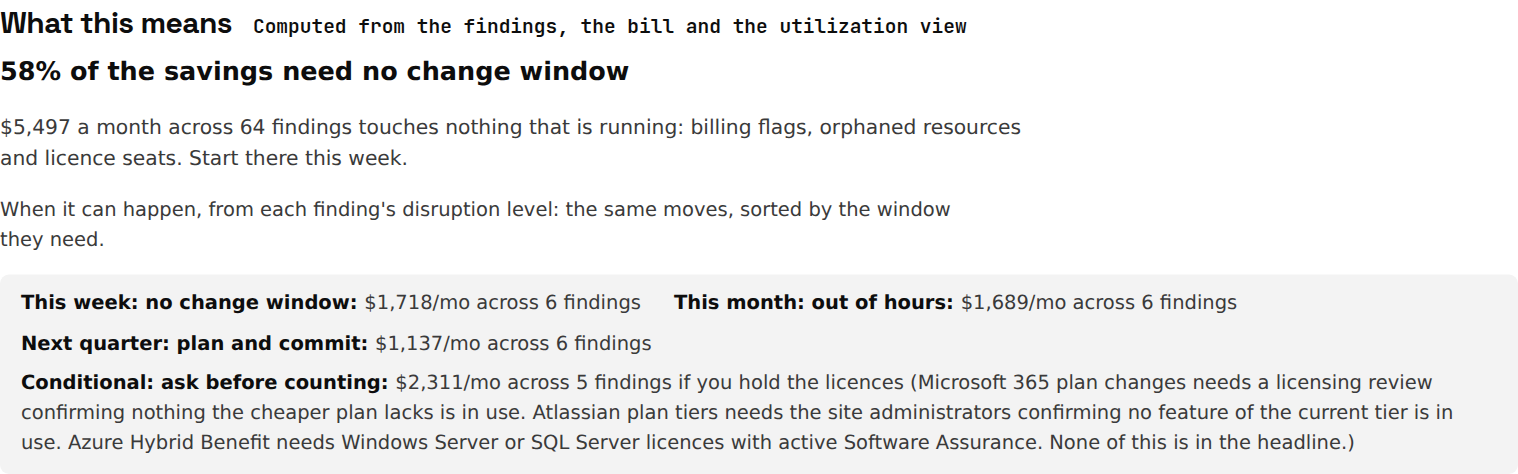
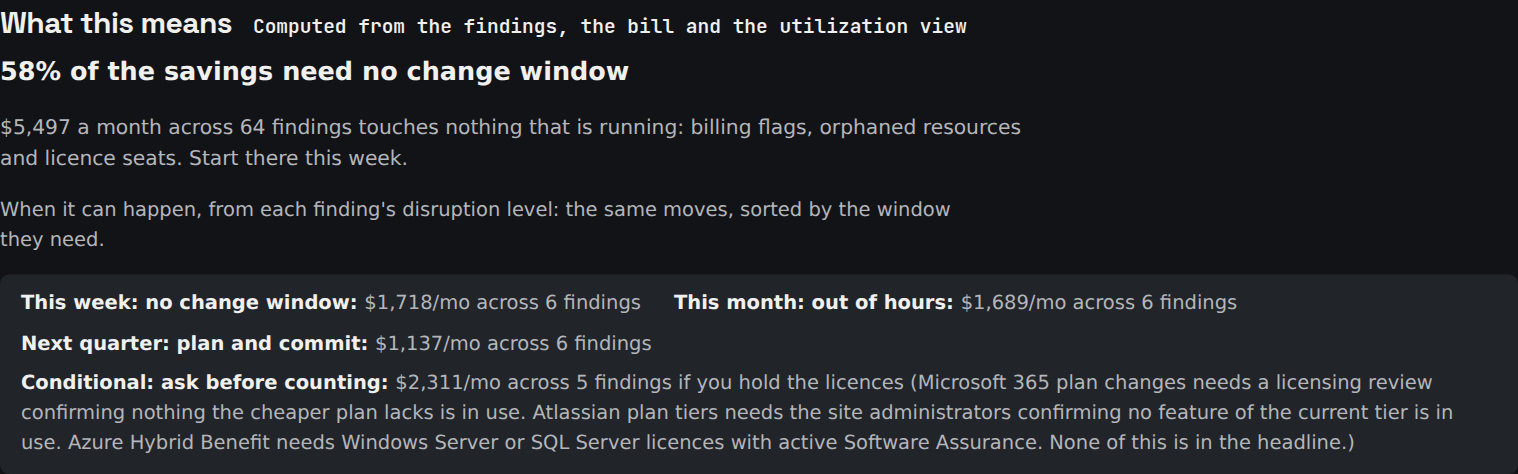
A plan you can start on Monday
This week needs no change window, this month runs out of hours, next quarter is plan and commit. Savings that depend on licences you may not hold sit in their own box, out of the headline.
 Full size ↗
 Full size ↗
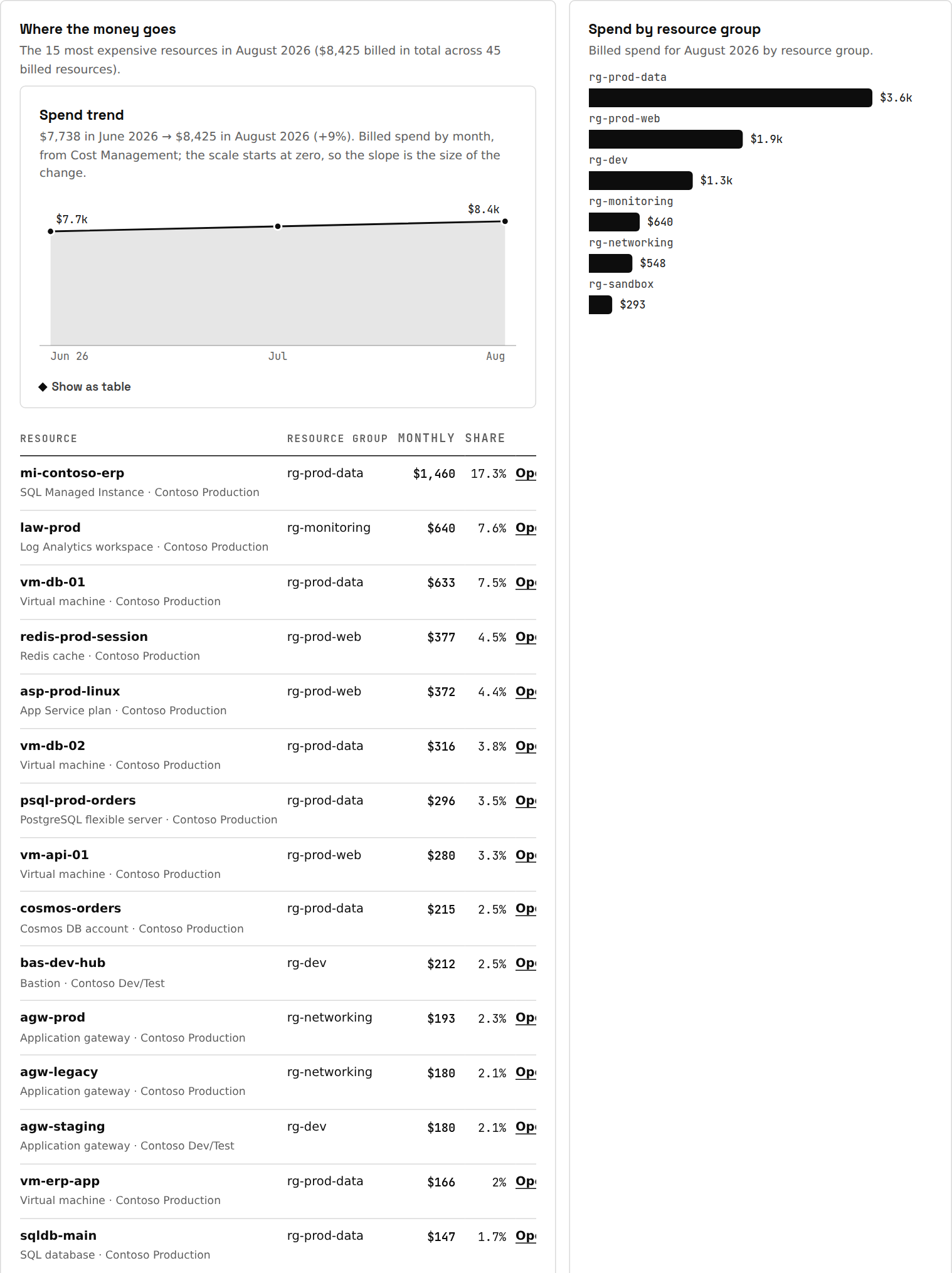
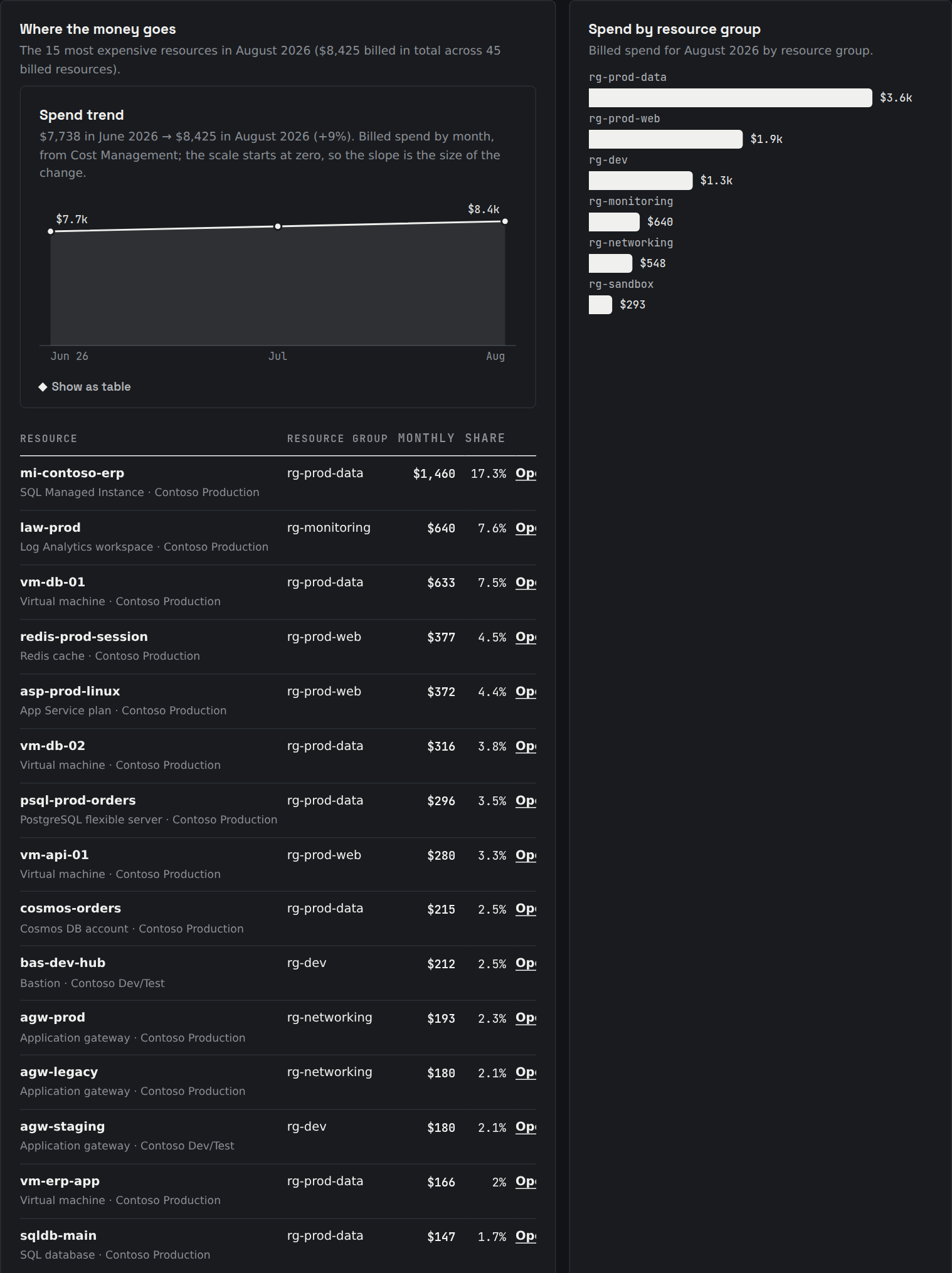
Where the money goes
- Actual bill, per meter. Priced from last month's Cost Management lines, so reserved compute and licence meters never pose as savings.
- Spend trend and movers. Three closed months by service, and what moved.
- Who owns the bill. Spend by resource group, and the share with an owner or cost-centre tag.
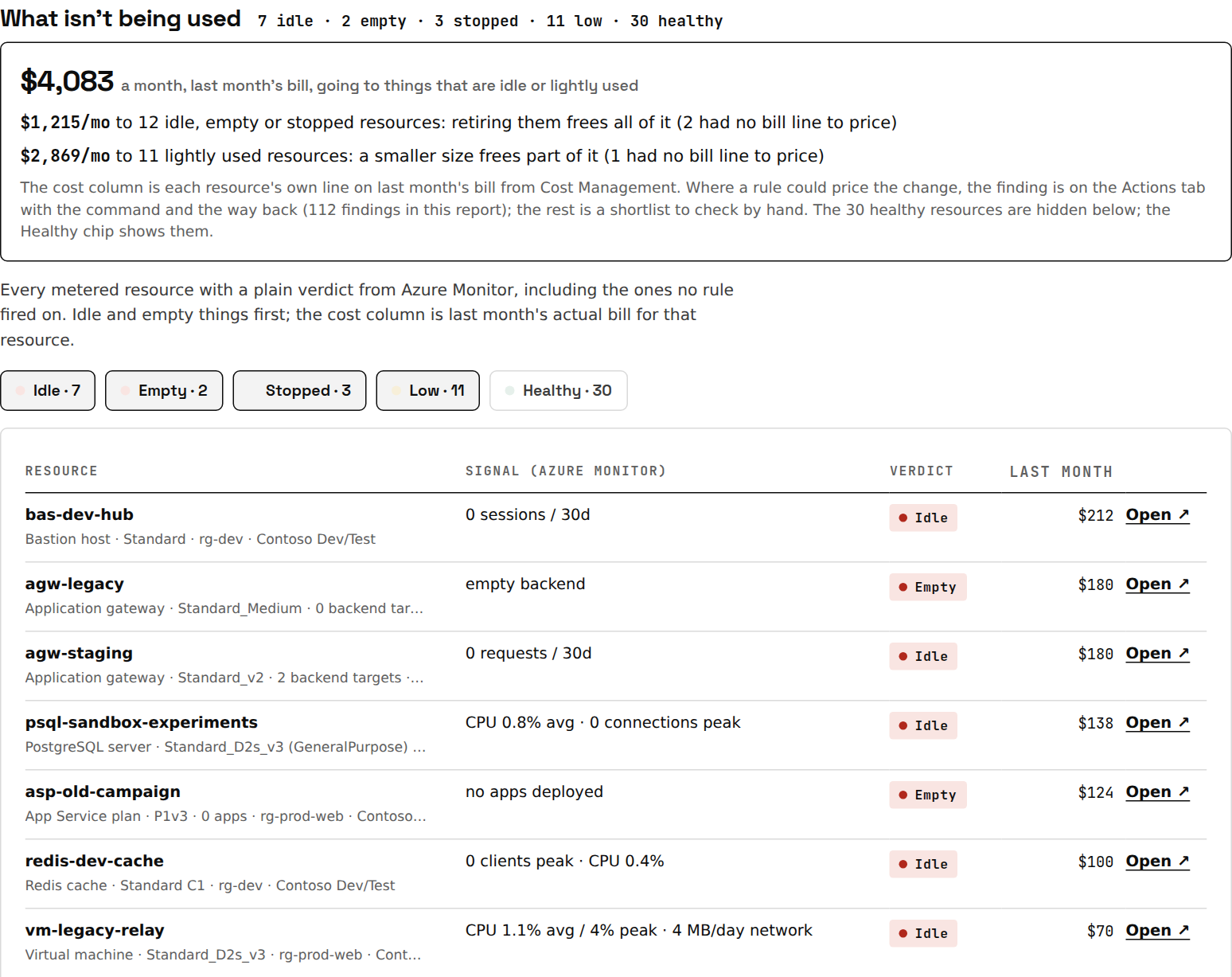
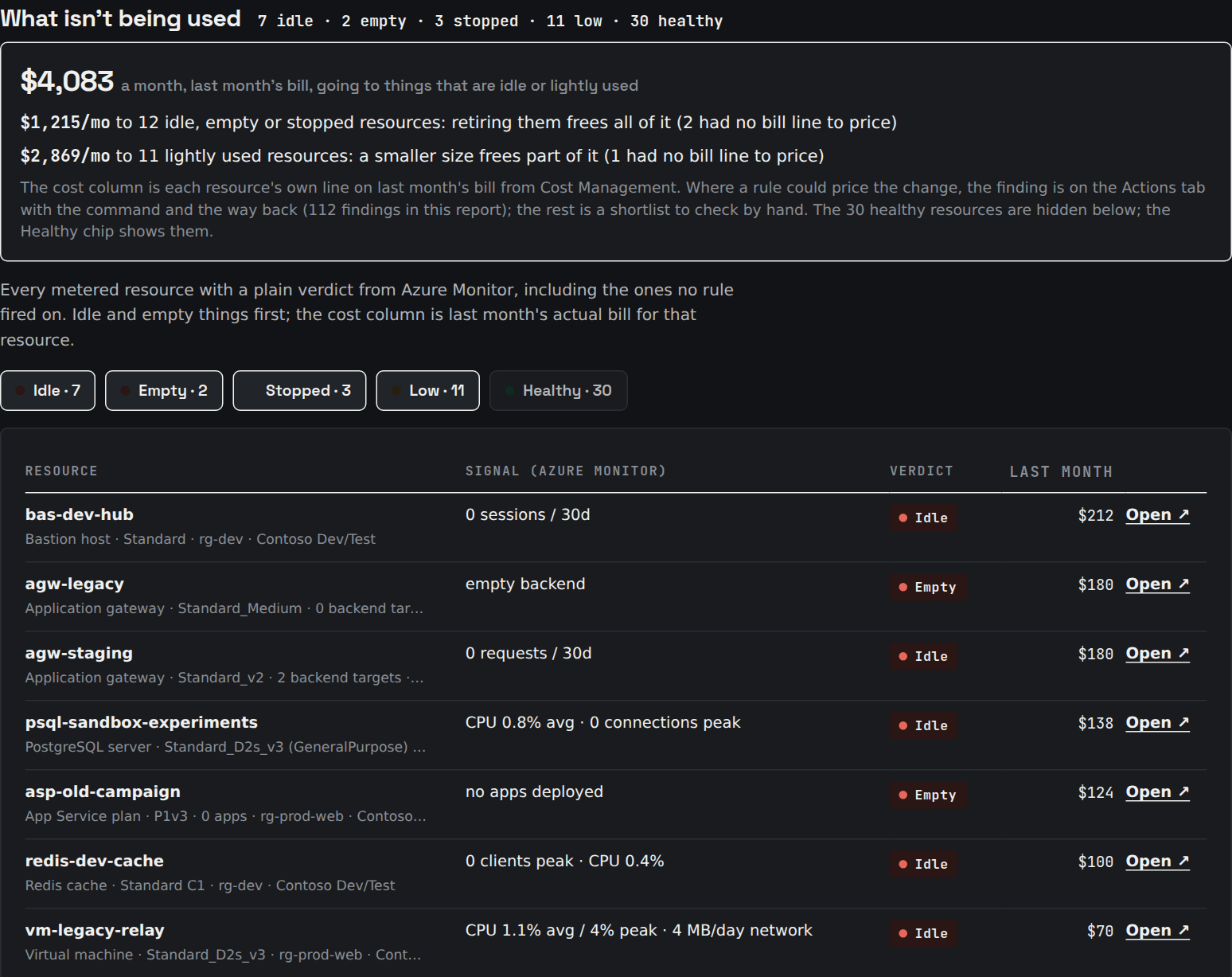
- What isn't being used. Every metered resource gets a verdict from its own metrics: idle, empty, stopped, low or healthy.
 Full size ↗
 Full size ↗
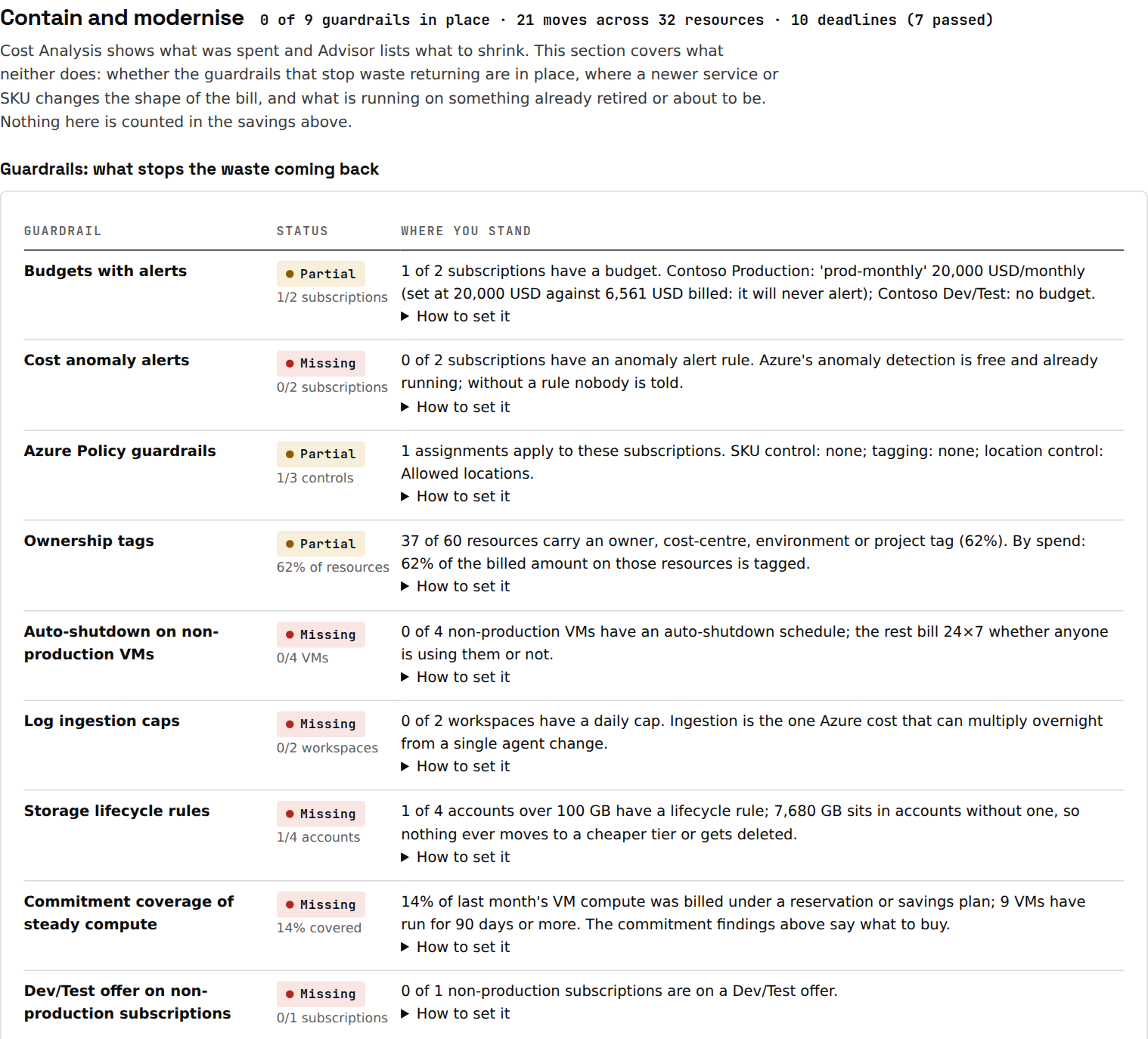
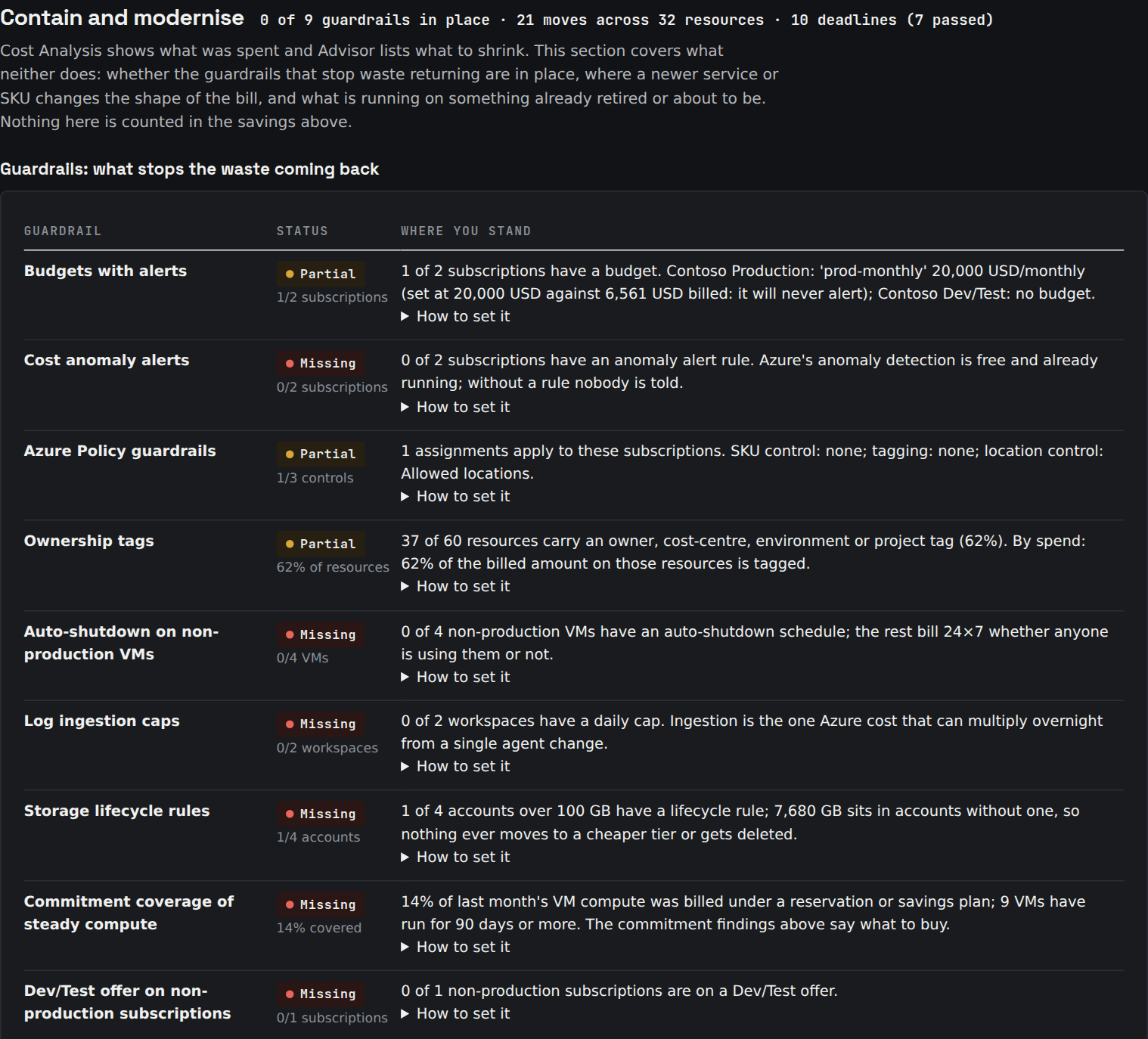
Stop the waste coming back
 Full size ↗
 Full size ↗
- 10 guardrails, checked. Budgets that alert, anomaly alerts, a cost brake on the subscriptions carrying AI spend, SKU, tag and location policies, auto-shutdown, log caps, storage lifecycle, commitment coverage, Dev/Test offers. Each with how to set it.
- Accepted risks stay accepted. Ignore a finding for a month, six, or for good; it never counts as recovered or comes back as new.
- Included from the Business band and with every plan.
Change what you run, not just how much
- Modernisation moves. Where a newer service or SKU changes the bill (Premium v3, Arm, Premium SSD v2, serverless SQL and Cosmos DB, AKS Spot, Container Apps, Flex Consumption, Bastion Developer, Managed Redis), with Microsoft's own statement of the effect.
- Retirements and end of support. Application Gateway v1, Basic load balancers and IPs, and the OS and SQL Server version on every VM, against Microsoft's dates.
- Application signals. Requests, latency, failures and database callers from Application Insights, host memory from Datadog or New Relic: autoscale findings shaped by load, and guards against right-sizing something already under strain.
- Commitments, honestly. Reservations and savings plans sized after right-sizing. Hybrid Benefit counts only if you hold the licences.
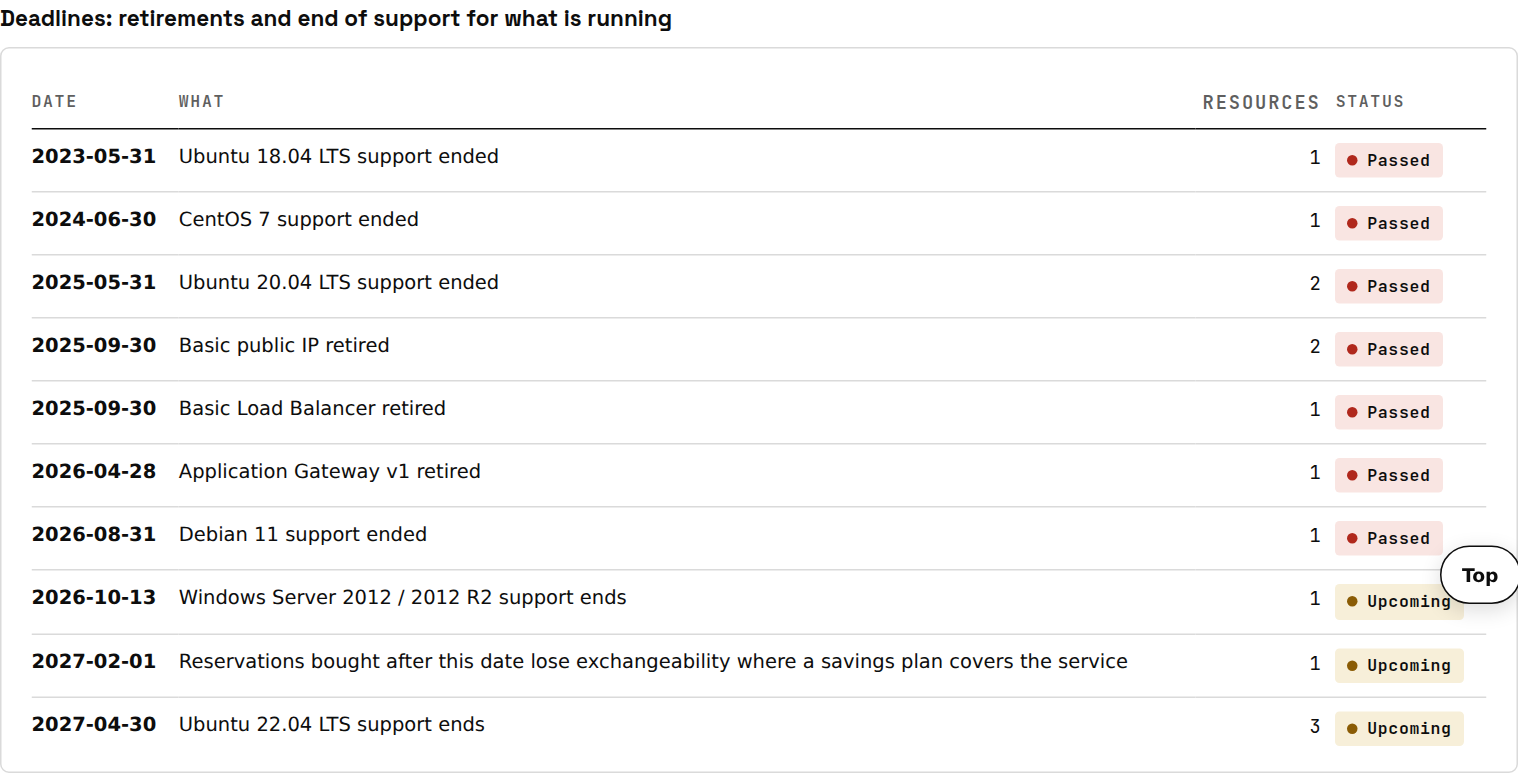 Full size ↗
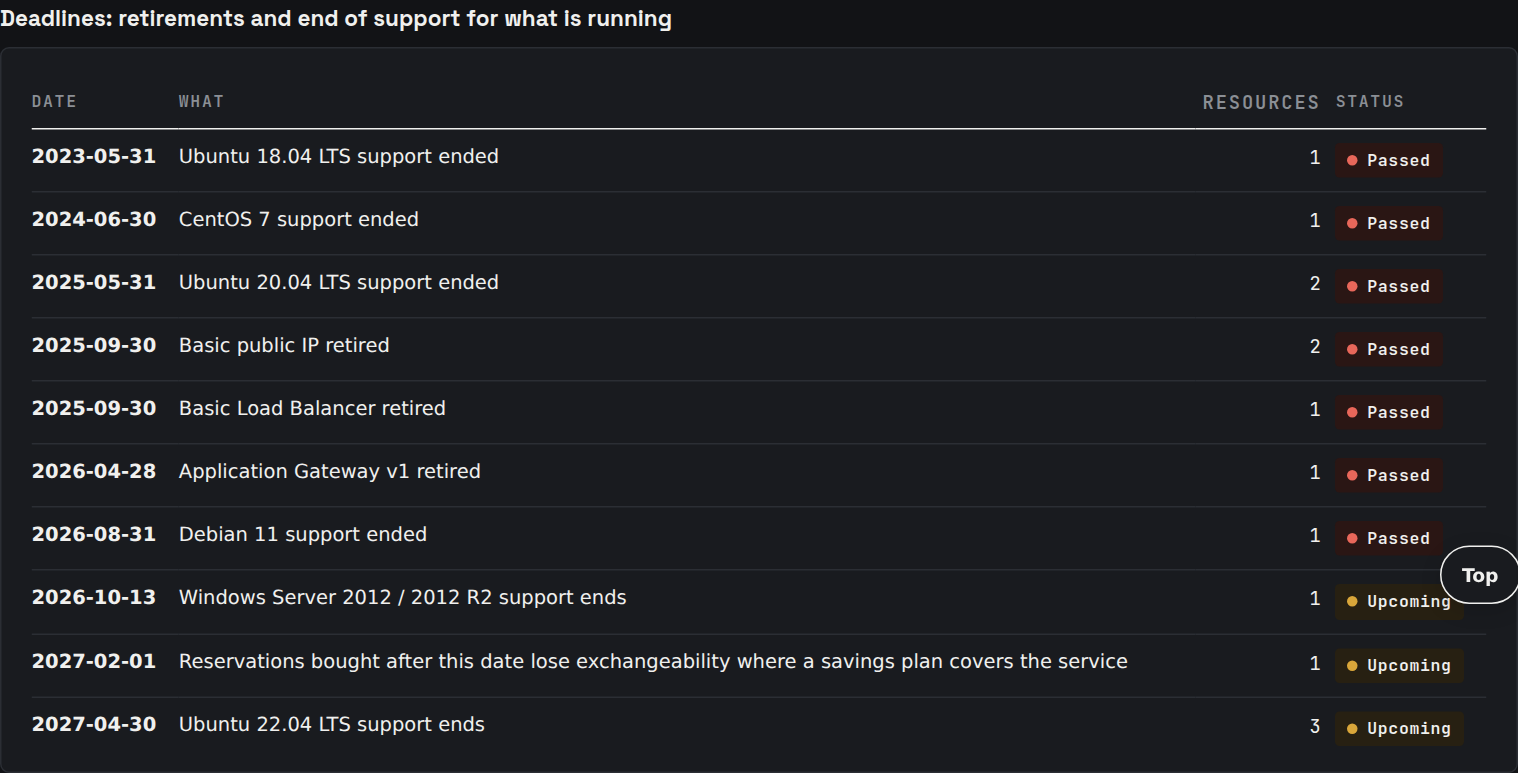 Full size ↗
Microsoft 365 in the same report
15 licence checks read eight usage reports, both kinds of sign-in and the registered devices, put every paid seat in a segment, and price the seats nobody holds and nobody uses from your own price list.
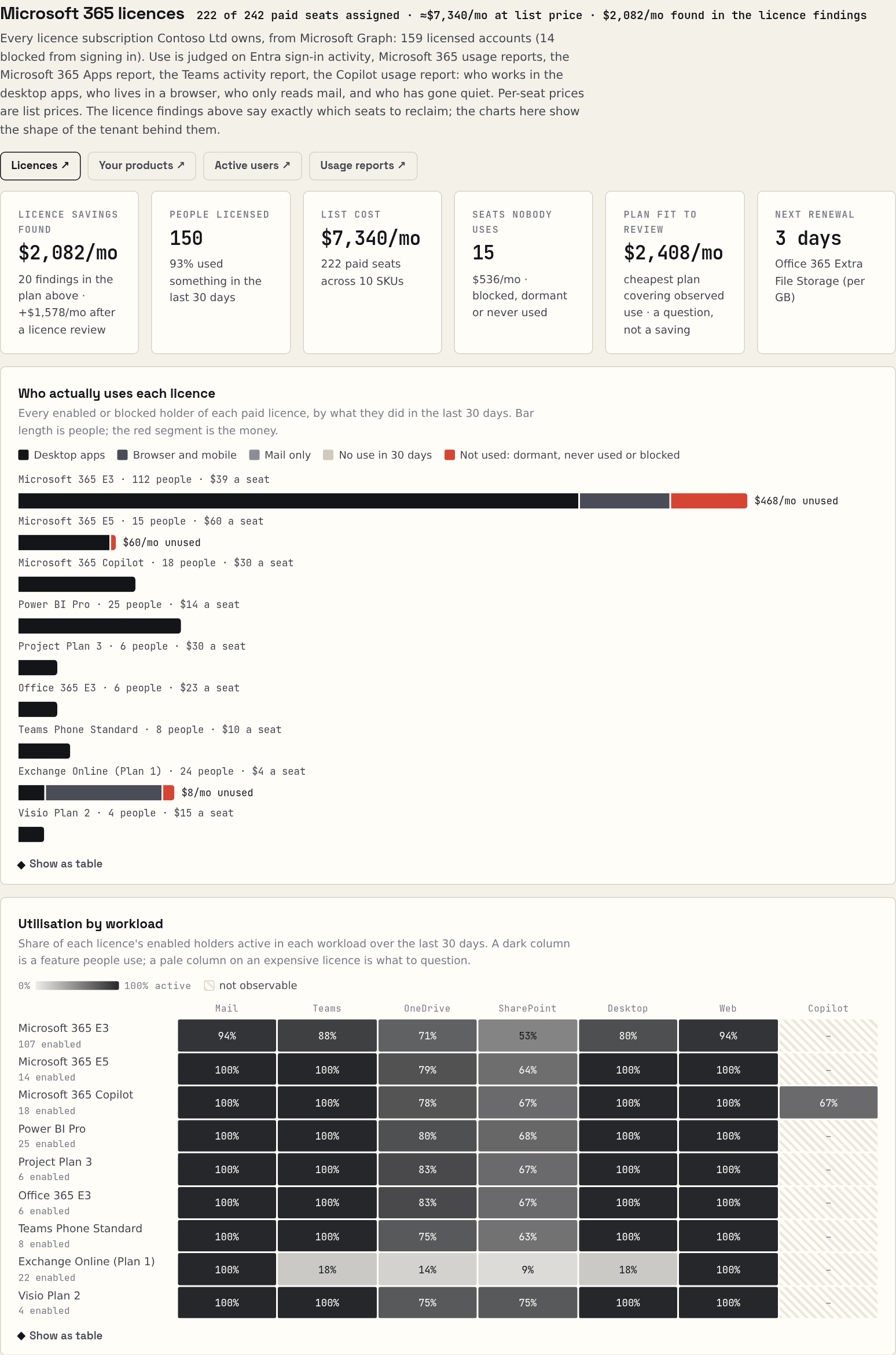 Full size ↗
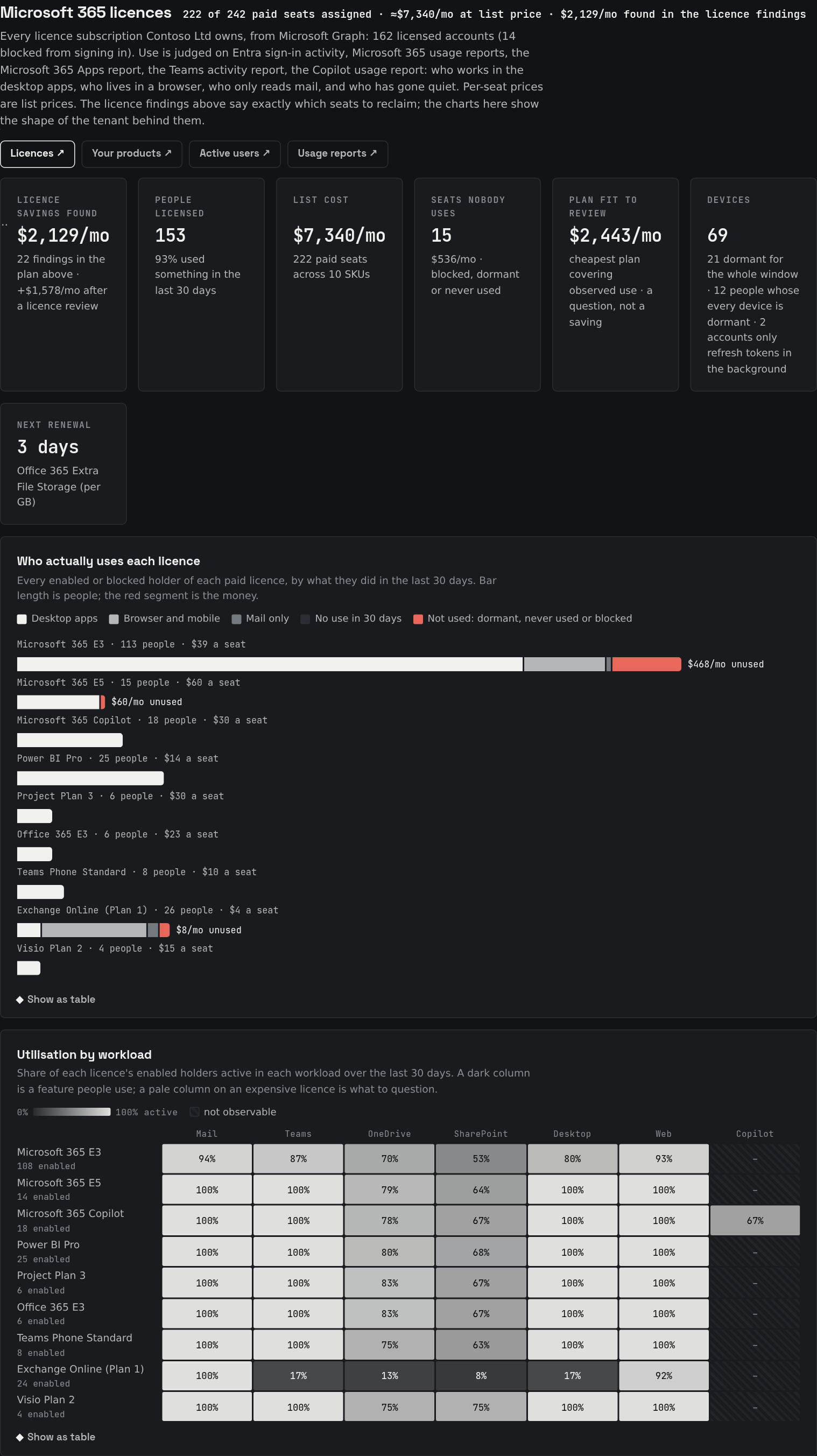 Full size ↗
What it finds
- Seats bought but not assigned, per SKU, at list price.
- Leavers still licensed, and licensed users nobody has seen in 90 days.
- Shared mailboxes carrying a licence they don't need.
- Copilot seats with no Copilot use, overlapping licences, suites nobody installed.
- Plan fit and renewals. The suite each segment needs, and every renewal on one timeline.
What isn't being used
Every metered Azure resource gets a verdict from its own metrics over 14 to 30 days: the evidence behind the right-size and delete findings.
 Full size ↗
 Full size ↗
The AI line, in a language you can read
Azure bills AI under one service name, on meters written for a billing system rather than a person: 5.6 luna LongCo Opt PP Gl 1M Tokens is a real one. The report says what the money actually bought, and finds the two places it is being spent at the wrong rate.
What it tells you
- What share of the bill the AI was. The first thing anyone asks, and nothing you already own puts it in front of you.
- Capacity against tokens. Throughput rented by the hour whether or not a single token goes through it, kept apart from what you paid per use. They are different purchases with different remedies.
- Global, Data Zone or Regional. Regional lists at about two and a half times Global for the same throughput, so the split is a price rather than a preference.
- Every meter as Azure spells it, so you can match the figure against Cost analysis yourself.
What it finds
- Provisioned throughput rented by the hour with nothing reserved behind it. Azure sells the same unit on a reservation for a fraction of the rate, and the shortest term is one month, so what you are weighing is one month of a bill you already pay. No model, endpoint, key or quota moves.
- Work charged at the immediate rate where the same model sells a batch rate at half. Priced and listed, and kept out of the headline until you confirm the work can wait.
What it will not do is tell you to change model. A smaller model is far cheaper per token and answers differently, and a cost tool that cannot measure the answers has no business ranking them.
And Copilot, which you are billed for twice
The seats are in the Microsoft 365 admin centre. The rest is on the Azure bill, under Microsoft Copilot Studio for agent credits and Microsoft Security Copilot for compute units. Neither of those says Microsoft 365, so the person who approved the seats has never seen them, and no Microsoft surface adds the two together.
The number nobody has
Both halves, added up and divided by the people who actually hold a seat. On our sample tenant twenty seats cost $600 a month and the metered half cost $1,386, so Copilot runs at $110 per assigned seat against a list price of $30. Whether that is good value is your call. Not knowing it is not.
The one saving, with its condition
Security Copilot sells the same compute unit at 4.00 an hour provisioned and 6.00 as overage. Provisioned bills around the clock; overage bills only for the hours drawn, so the third is real only if the draw is close to constant, and below about two thirds of the hours provisioning costs more. The report prices it, states the condition and keeps it out of the headline until you confirm the shape on your own usage dashboard.
Pillar two · Prove
Did it work?
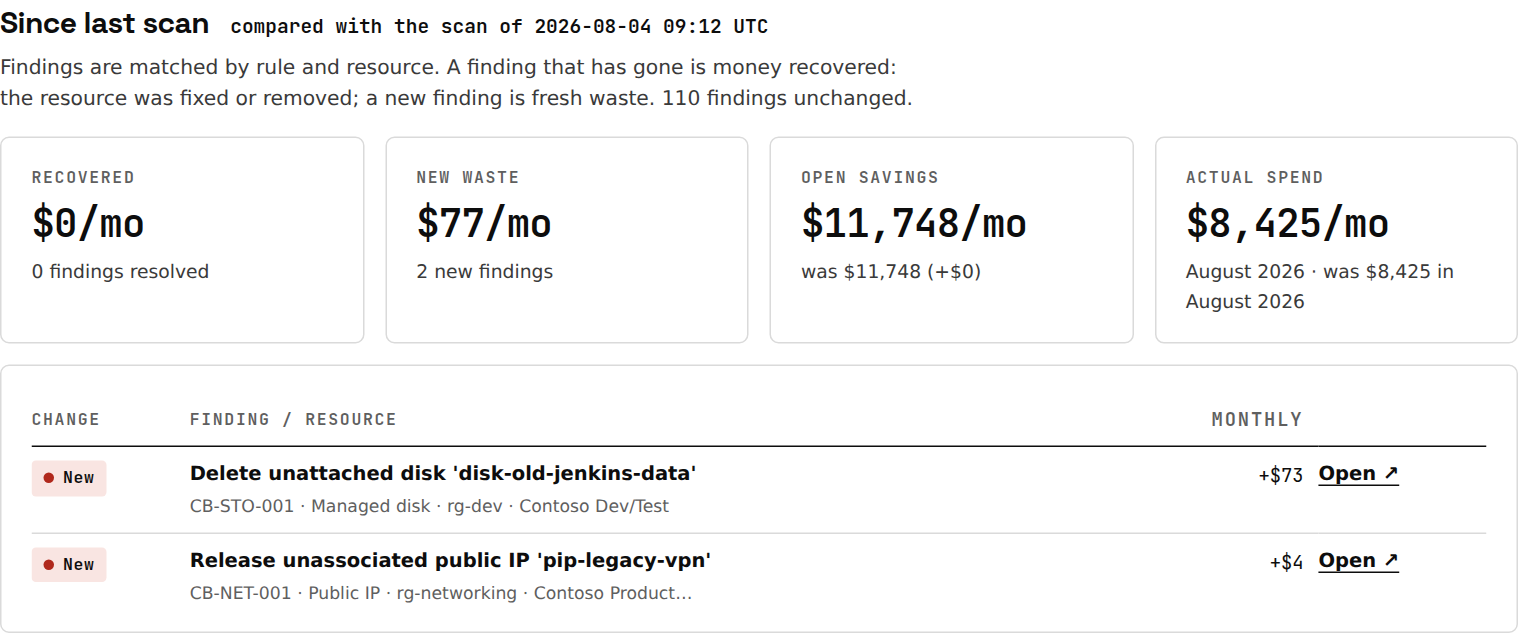
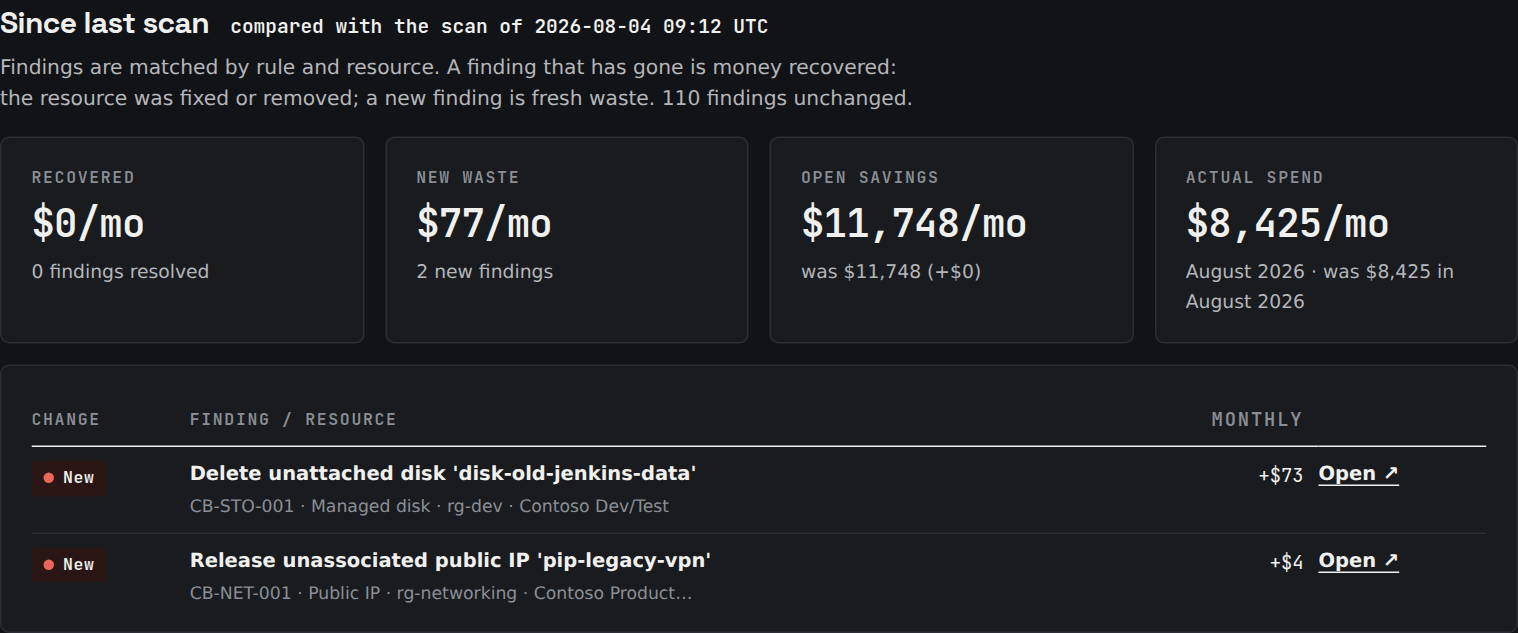
A rescan knows which findings went. Each is valued at its run-rate from the day it was seen gone, then checked against the next closed bill, meter by meter. That is the number for the board pack.
- Since last scan. What was recovered, what is new, what moved, and the resources that went.
- Confirmed by the bill. A recovery is provisional until a later billing month shows the resource gone or its cost down; one still billed says so, in red.
- Rescans included. 30 days with every report; every 30 days under Monitor, with an email of what changed.
- A number for the board pack. Recovered run-rate, realised to date and the return on what you paid, per tenant and per account, never invented.
 Full size ↗
 Full size ↗
 Full size ↗
 Full size ↗
What the check looks like
On the sample estate: 10 findings gone between two scans, $168/mo recovered. Checked against the August 2026 bill: $148/mo confirmed gone across 9, and $20/mo still on the bill.
That last one is the one to look at. It is the recovery you thought you had made and have not, and nothing without a month-by-month bill comparison can tell you about it. Your own figures come from your own bill; these are the sample estate's, in USD.
Pillar three · Watch
What changed, and what is about to?
Two halves. Looking back, the spend watch, under Monitor: every day it reads the cost of every resource and compares every subscription, resource group, service and resource with the same weekday over the previous six weeks, and when something moves you get the resource that caused it and the finding that closes it, the morning it is first seen. Looking forward, the commitment calendar, in every report: the Azure reservations, AWS savings plans and Microsoft 365 licence terms you have already paid for, with the date each one ends and what that date does.
The two dates do opposite things and the calendar keeps them apart. A reservation or savings plan ending puts the price back up if nobody renews or replaces it: nothing breaks, no alert fires, and the same machine costs more from that morning. A licence term is the reverse: its renewal is the only day seats can come off, and letting it pass holds the count for another term. Where the increase can be priced the report says what from; where it cannot, it says so rather than showing a guess. None of it counts toward the savings figures, because money you have not started losing is not money freed.
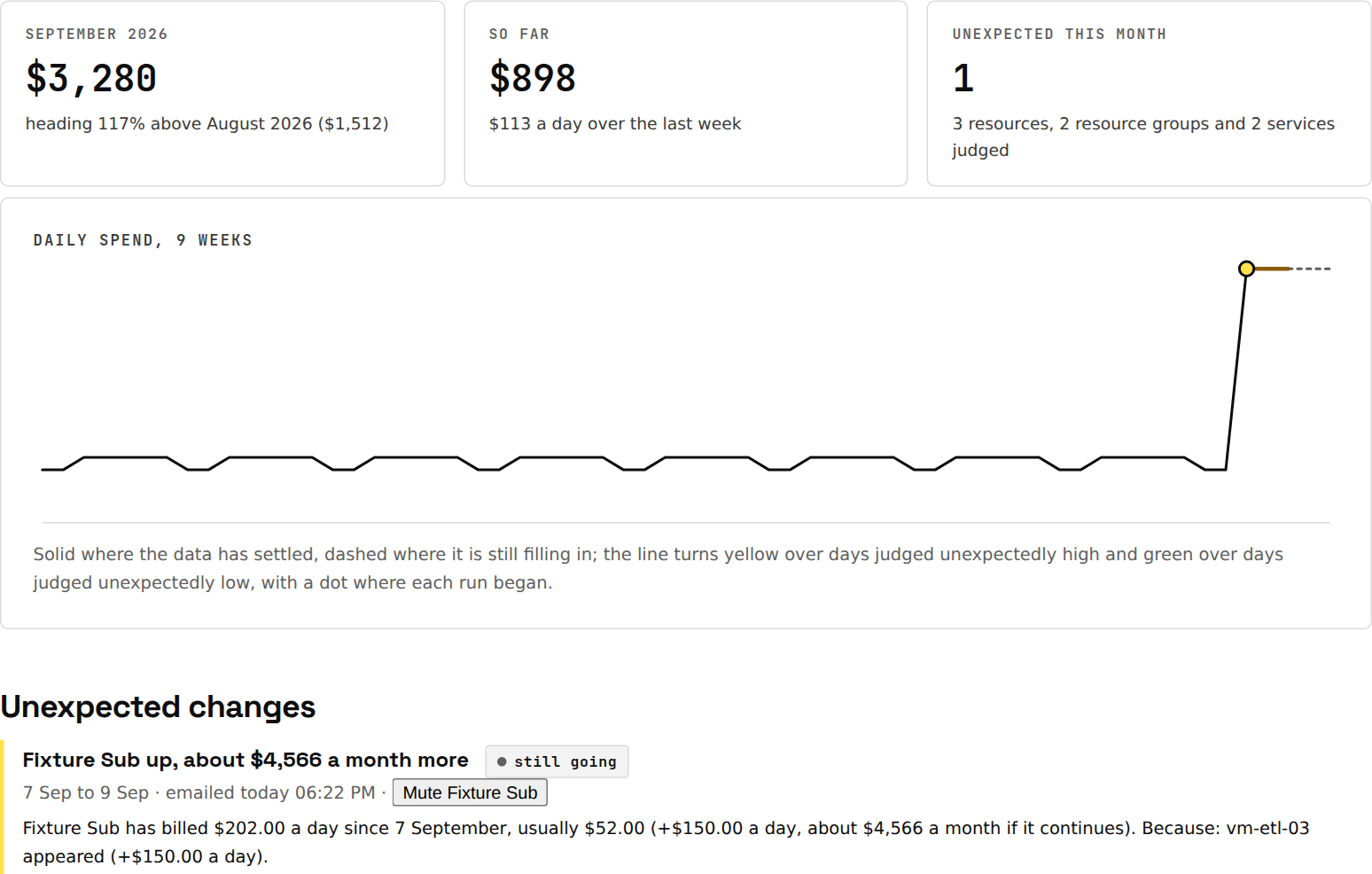 Full size ↗
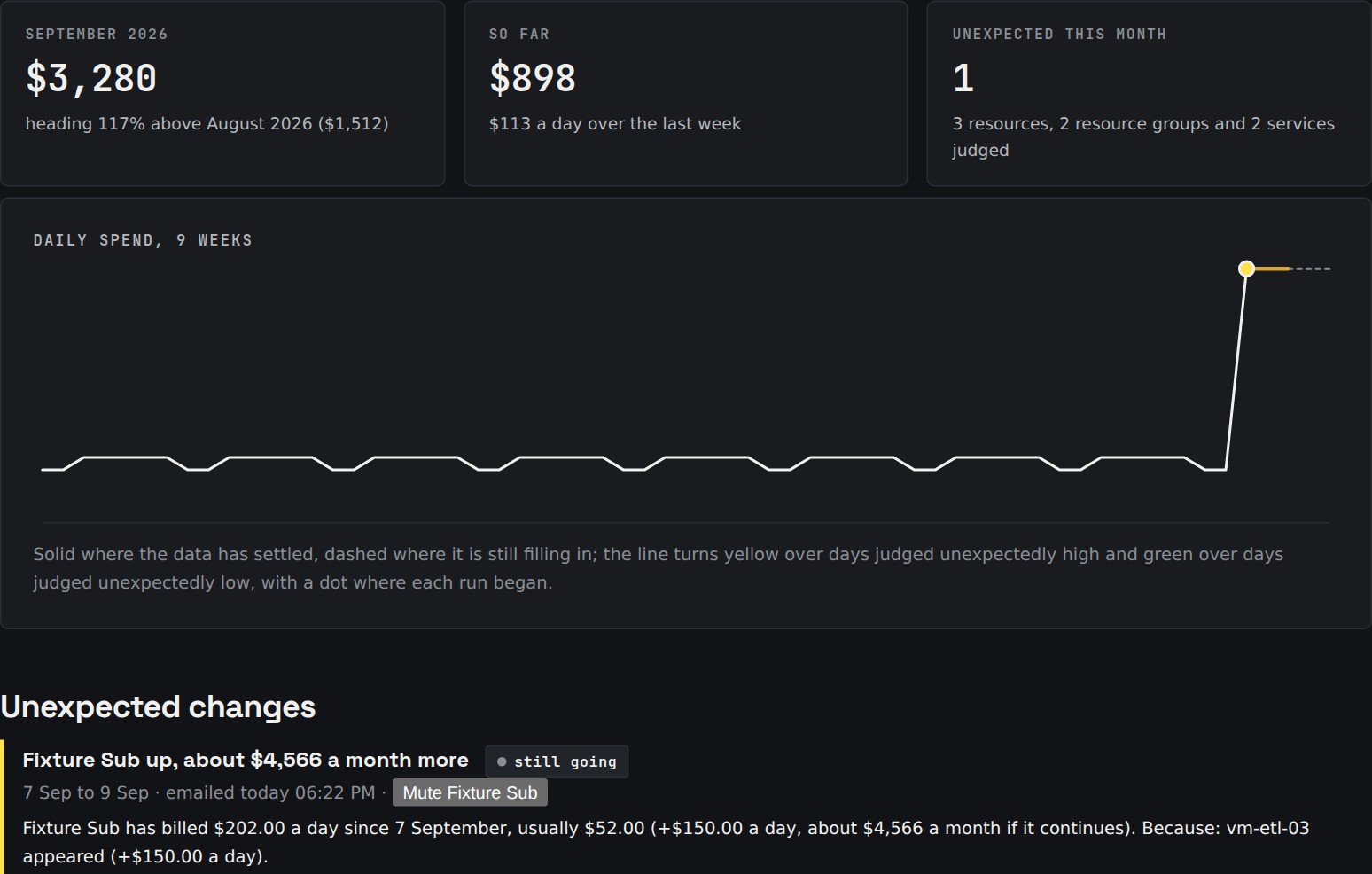 Full size ↗
- Every scope. A new VM too small to move the bill still gets its line; a resource group that doubled gets one with the VM as the cause.
- Explained. Which resource appeared, grew, shrank or went, and the open finding that would close it.
- Spikes, shifts, new and stopped. Drops are reported too: usually a recovery, sometimes something that stopped working.
- Honest about settling. The newest two days are never judged, and a departure that vanishes once its days fill in is withdrawn.
- Yours to tune. A minimum change, mutes for known batch work, tags as estate-wide series, delivery to Teams or Slack.
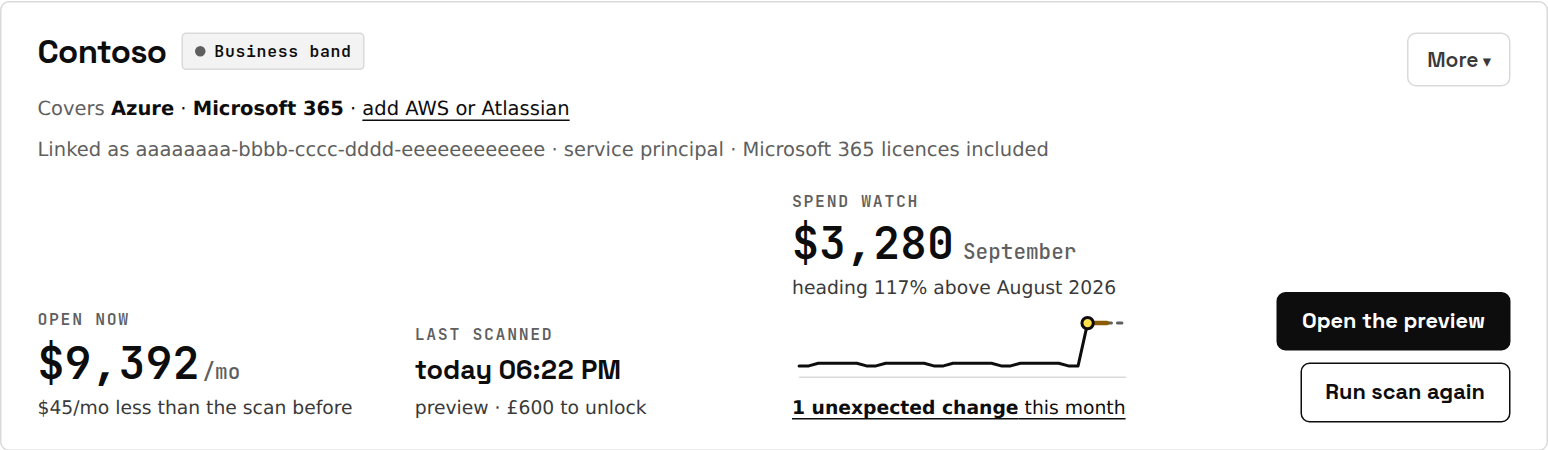 Full size ↗
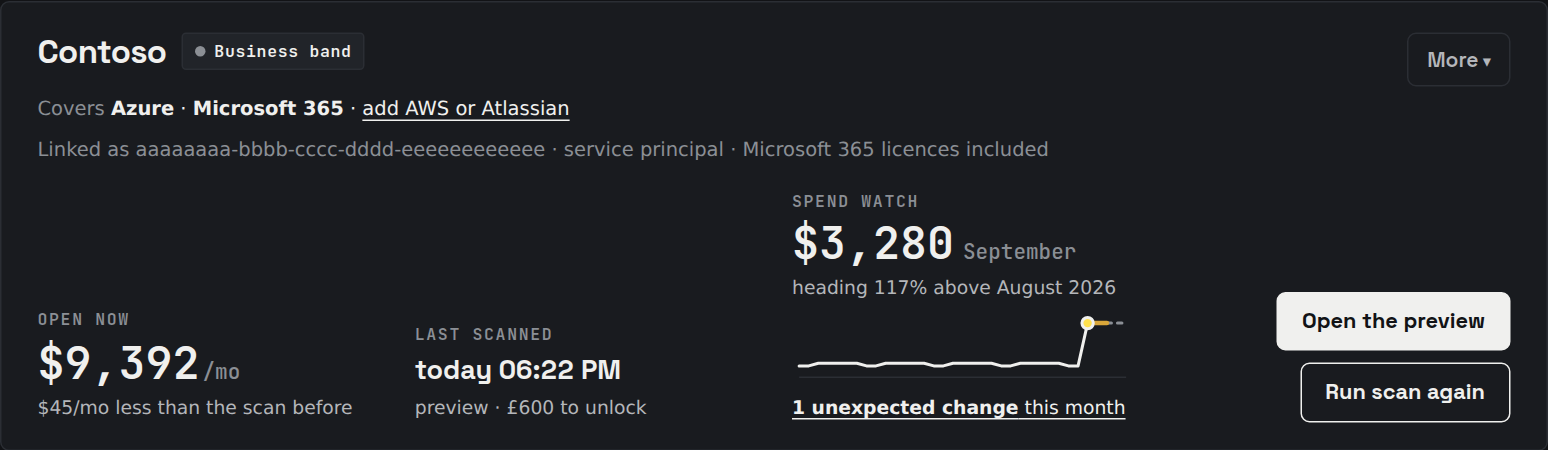 Full size ↗
Azure's own anomaly alerts work at subscription scope, five per subscription, and say nothing about why. Without Monitor you still see that something happened; the cause, the finding and the email are what Monitor adds.
See it on your own tenant
The preview is free and changes nothing.
Link a tenant by consent, wait 5 to 20 minutes, and see the headline before paying anything. The spend watch starts within a minute of the first scan.
The edition · Partner
For MSPs and consultants: all three, across every client
Partner runs all three across 5 client tenants of any size for £245 a month: every report unlocked, a rescan every 30 days, the spend watch on each, and a private page per client of what they are missing that you sell. Walk into the quarterly review with the number already in hand.
Where each one lives
The preview, the report, the dashboard, the spend watch page, the emails and the exports, in one list
- Preview page (free): headline savings with licence-conditional amounts stated separately, the plan in brief, the contain-and-modernise counts, the biggest opportunities.
- Full report: every finding with evidence, command and rollback; what this means; contain and modernise (from the Business band and with every plan); where the money goes; what isn't being used; the licence inventory; since last scan.
- Dashboard: one card per tenant with what is open, the spend watch and the ledger with bill-confirmed recoveries and the return on what you have paid.
- Spend watch page, per tenant: nine weeks of daily spend, the outlook, every unexpected change with its cause, and Check now.
- Email (Monitor and Partner): unexpected spend the morning it is first seen, and the digest after each rescan: what was recovered, what is new, and the running tally.
- JSON and CSV: everything above for tickets, spreadsheets and your own reporting.
Why not just use Azure Advisor?
Spendlint includes every Advisor cost recommendation, de-duplicated against its own. Advisor prices at retail, ignores reservations, looks at seven days of CPU by default, and never sees a stopped-but-billing VM, an orphaned IP or a Microsoft 365 licence.
| What you get | Azure Advisor | Spendlint |
|---|---|---|
| Savings priced from last month's actual bill, reserved compute excluded | Retail list rates, reservations ignored | Yes |
| Utilization window | 7 days by default | 14–30 days, every metered resource gets a verdict |
| Stopped-but-billing VMs, orphaned IPs, empty gateways, unused Bastion and NAT | Only in a separate preview workbook | Yes, priced |
| Azure Hybrid Benefit, previous-generation sizes, parked Premium disks | Not in the cost list | Yes |
| Defender for Cloud plans on non-production subscriptions | No | Yes |
| Log Analytics commitment tiers and Basic-logs tables | Partly | Yes, per table from the Usage data |
| Microsoft 365 licences: unassigned seats, leavers, inactive users, shared mailboxes, Copilot, overlapping suites | No | Yes |
| Copilot all in: the seats in the admin centre plus the metered credits on the Azure bill, per person who holds a seat | No | Yes |
| Disruption rating, the command, the rollback | Guidance only | Every finding |
| Whether the guardrails against waste are in place: budgets that alert, anomaly alerts, SKU and tag policies, auto-shutdown, log caps | Each lives in a different blade; nothing checks them together | 10 checks, each with how to set it |
| Newer services and SKUs that change the bill, and retirements with dates | Generation upgrades only | Modernisation moves and a deadline table per estate |
| What changed since last time | No | Every rescan |
| Unexpected spend, explained | Anomaly alerts at subscription scope only, five per subscription, no cause | Every scope, daily, with the resource that caused it and the finding that closes it |
| What you actually saved, over time | No | A ledger per tenant: recovered run-rate, realised to date, return on the price |
| Commitments priced against a cleaned-up estate | A savings plan sized on today's usage, including the machines Advisor also told you to delete | Held back until the waste is gone, and it says why |
| Two savings that are really one, added up | Recommendations do not know about each other | Counted once, with the overlap named on the finding |
| A written summary a finance director can read | No | Yes, with every figure traced back to the report |
The one that costs real money
Advisor will recommend a three-year savings plan priced on the usage running today, including the idle machines it also told you to delete. Buy the term first and act on the list second, and you go on paying for workloads that no longer exist until the term ends. The two recommendations are not additive; done in the wrong order they cost more than doing nothing.
Spendlint holds a commitment back from the headline while the same subscription still has waste in it, and prints the reason on the card. It does the same for its own findings: two ways at the same money on one resource (scaling a Managed Instance down and applying Hybrid Benefit to it, say) are counted once, with the overlap named. The sample report shows both.
Sources: Microsoft Learn, Advisor cost recommendations (retail-rate and reservation limitations, 7-day default) and the Cost Optimization workbook (preview).
What it is worth
Put in your monthly spend and see the range the surveys suggest, what the report and Monitor cost, and how fast they pay back. Illustrative; the free preview shows the real figure.
Cautious rates are Spendlint's own floor, well under the surveys: 29% of cloud spend self-reported as waste (Flexera 2026), 36% of paid SaaS licences unused (Zylo 2026). A scan that finds less than its report price unlocks the report free.
Bands and prices
Priced by the size of the estate the scan measures, shown before you pay. A band price is a ceiling, not a promise: a report never costs more than half of what its first month frees up, so a big estate with little to find is charged for what was found. The preview is free whatever the size.
| Band | Azure + Microsoft 365 spend | Report, one-time | Monitor, per month | Monitor, per year |
|---|---|---|---|---|
| Starter | under £5,000/month | £250 | £79 | £790 (2 months free) |
| Business | £5,000–£25,000/month | £600 | £149 | £1,490 (2 months free) |
| Enterprise | £25,000–£75,000/month | £1,200 | £299 | £2,990 (2 months free) |
| Enterprise Plus | over £75,000/month | £2,400 | £499 | £4,990 (2 months free) |
Prices exclude VAT. 14-day money-back on any report. A report never costs more than half of what its first month frees up. Guarantee: a scan that finds less in a month than its band price makes that report free. Partner covers 5 tenants of any size for £245 a month; more tenants, talk to us.
How it treats your tenant
- Read-only. One delegated management scope, used only for reads, never above the Reader role you hold; five read-only Graph permissions for Microsoft 365. Nothing is ever changed.
- Actual bill first. Last month's real cost where it exists; list prices are labelled as such; overlapping options are counted once.
- Where your data lives. On Azure in Europe, credentials encrypted at rest; delete your reports and your account at any time.
- Every number shows its working. Every finding shows the evidence it was priced from and the rule that raised it, with the command and the way back.
- Kept current. Every date, price and ratio the rules rest on carries a review date and is checked weekly against its source: retirement and end-of-support dates, price sheets, licensing ratios. The report says when they were last confirmed.
- Benchmarks, anonymised. Ratios per price band from every real tenant scanned, shown from five tenants up; leave the pool on the account page.
- No card details here. Payments run through Stripe; we keep the reference and the amount.
- Nothing to install. Linking registers Spendlint as an enterprise application with read permissions; remove it under Entra ID when you leave. Reports stay 90 days or until you delete them.
Questions people ask
Does it change anything in my tenant?
No. Every call the scan makes is a read: list resources, read metrics, read the bill, read licence assignments. The report tells you what to change and gives you the command; running it is your decision.
What access does it need?
An account with Reader on the subscriptions you want scanned, plus Cost Management Reader for actual spend. Microsoft 365 licence analysis needs a Global Administrator to grant five read-only Graph permissions once. A service principal works too. Pay-as-you-go, Enterprise Agreement and Microsoft Customer Agreement subscriptions give full actual-cost data; some CSP subscriptions don't expose Cost Management, and those findings are priced at retail and say so.
How accurate are the numbers?
Each finding says what it was priced from: last month's bill for that resource, the live retail rate for your region, or the built-in price sheet. Reserved and savings-plan compute is excluded so a change there never counts as a saving. Overlapping recommendations are counted once.
How is the price decided?
By the monthly Azure and Microsoft 365 spend the scan measured, in three bands: Starter (under £5,000/month) £250, Business (£5,000–£25,000/month) £600, Enterprise (£25,000–£75,000/month) £1,200, Enterprise Plus (over £75,000/month) £2,400. You see the band and the price on the preview, before paying. Estates far above the top band: talk to us.
What if you find very little?
The preview is free, so you see the headline before paying anything.The charge follows what was found: never more than half of the first month. And a scan that finds less in a month than its band price unlocks that report for free. Any report comes with 14-day money-back.
Could we build this ourselves?
The scan, yes: a good engineer with an AI assistant can rebuild the rules and the report in a fortnight. What cannot be rebuilt from code is what accumulates: the dated facts the rules rest on (retirement dates, price sheets, licensing ratios), each checked every week against its source; the benchmark of how tenants like yours compare, which exists only because they were scanned here; and your own history, every scan compared with the one before and every recovery checked against a later bill, which starts at zero in any new tool. The first dashboard is cheap; the upkeep is the cost, and it falls on whoever has time this sprint. That is what makes an account cheaper to keep than to keep up.
How does the spend watch decide something is unexpected?
Each day of each series is compared with the same weekday over the previous six weeks: the median, with a deviation floored at 5% and one unit a day. Three deviations and at least five units a day is unexpected; three days in a row is a sustained shift; something that matches the same day of the previous month is a monthly charge, not news. The newest two days are left to settle, and a departure that is gone once its days fill in is withdrawn. Nothing is changed in the tenant; it is one read a day.
Can my colleagues see it too?
Yes. Whoever linked the tenant invites colleagues from its People page; each accepts with their own Microsoft work account from the same directory, so the report never reaches anyone who cannot sign in to that tenant. View only, view and act, or manage; unlinking and paying stay with the account that linked it. One plan covers the tenant, however many people are on it.
Is AI involved, and does it see my data?
The findings, the prices and the plan are computed by rules, not by a model. With AI enabled, a short written narrative is produced by an AI model from a brief containing only the figures in your report, never the inventory, and every number it writes is checked against the report. The provider is named in the privacy notice. Without it, the report reads the same with a computed summary.